Thursday, 27 November 2014

Microsoft Excel: How to split a comma or any delimited (pipe, colon, etc) text in one column to separate columns?

How to split a comma or any delimited (pipe, colon, etc) text/data in one column to separate columns in microsoft excel?


In the example below, all the data is in the first column. Now how do you split it to separate columns in Microsoft Excel? Easy. Look at the next screen.


Select the first column, go to Data tab and press the Text to Columns button and you will see the Convert Text to Columns wizard. You can select Delimited file type and press next and select comma as the delimiter. If you have pipe delimiter then select | as the delimiter and follow the next steps in the wizard.


How to connect to Hadoop Hive using Beeline?

How to connect to Hadoop Hive using Beeline?

 Apache Beeline is a hive command line client that can be used to connect to Hive server and execute HiveSQL,etc. Beeline uses JDBC to connect.


Sample beeline command to connect to hive server is shown below:

localhost> beeline

beeline> !connect jdbc:hive2://localhost:10000
scan complete in 8ms
Connecting to jdbc:hive2://localhost:10000
Enter username for jdbc:hive2://localhost:10000: admin
Enter password for jdbc:hive2://localhost:10000:
Connected to: Apache Hive (version 0.12.0-cdh5.1.2)
Driver: Hive JDBC (version 0.12.0-cdh5.1.2)
Transaction isolation: TRANSACTION_REPEATABLE_READ
0: jdbc:hive2://localhost:1000> show databases;
+----------------+
| database_name  |
+----------------+
| sample         |
| default    |
| employee        |
| operational       |
| test_hive_db   |
+----------------+
5 rows selected (0.52 seconds)
jdbc:hive2://localhost:1000> use test_hive_db;

jdbc:hive2://localhost:1000>select * from employee;

Check the link below to load files to hive:
http://dwbitechguru.blogspot.ca/2014/11/how-to-load-local-data-file-into-apache_25.html 

To truncate apache hive tables and delete files from hdfs:
 http://dwbitechguru.blogspot.ca/2014/11/how-to-truncatedelete-apache-hive-table.html


More details about beeline is in the below link:

https://cwiki.apache.org/confluence/display/Hive/HiveServer2+Clients


How to change the delimiter character to pipe or colon in Microsoft excel csv file? Also, change digit grouping, other format settings.

How to change the delimiter character to pipe or colon and other format settings such as digit grouping  in Microsoft excel csv file?


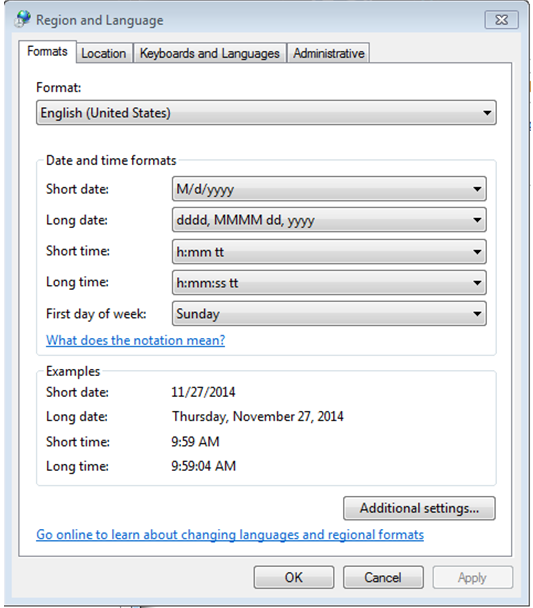
Every time you save a file as .csv (comma separated) file in Microsoft Excel, the file will have comma (,) as the delimiter character. In some instance, we want to change the delimiter to ; or | or other delimiter character. For those instances, you need to use the below instructions to change the delimiter settings. Similarly in the last screen shown below you can see that you change other format settings.

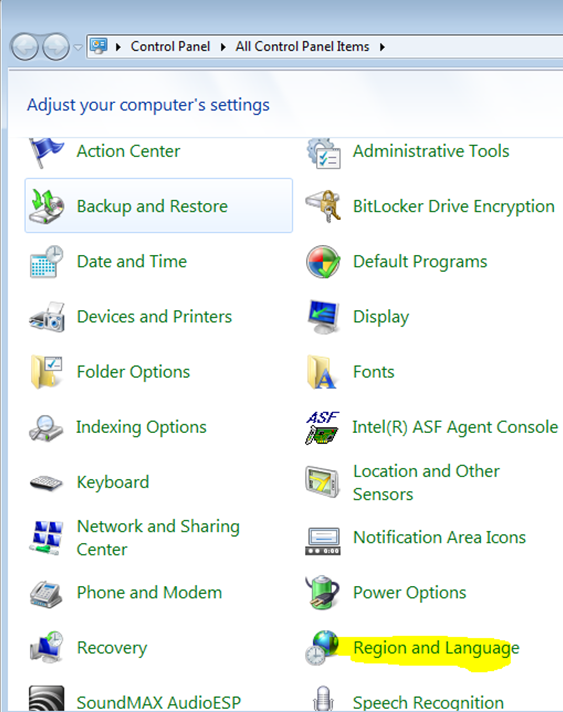
Step 1: Go to region and language on your control panel.


Step 2: Press the additional settings button in the region and language window.


Step3: In the numbers tab, you will see a field called List Separator. In that field enter the character you want to see as your delimiter. In the example below, I have it as ; . Press apply and you are good to go. Also in the screen below you can see that you can change other format setting such as digit grouping etc.

After you done with these setting changes, you can go back to your Microsoft excel and try to save the files in .csv format. Now the file will be saved with ; colon as the delimiter.

Tuesday, 25 November 2014

How to a load a local data file into hadoop apache hive ? Example of tweets getting loaded into Hive.

How to a load a local data file into apache hive ? Example of tweets getting loaded into Hive ?


What is Apache hive?
Apache Hive is a Data warehouse system originally built by facebook and runs on  top of the Hadoop/HDFS i.e. actual data is stored as files on HDFS and Hive is used to query and manage the data. Hive stores meta data such as table structure, table definition in its meta store database which is usually derby or mySQL. You can run simple SQL called the Hive SQL to query the hive data warehouse just in other SQL based data warehouse.


In the example below, a sample tweets file is loaded into hive.

Step1: Download the sample tweets file of sachin tendular tweets and save it some local folder on your unix system. Lets say you saved it in /home/desktop folder. The sample tweet file captures only three fields which are the screenname, tweet text and a field indicating if the tweet is retweeted.


The sample tweets file can be found using the link below. Copy and save the file as sampletweets.txt in /home/desktop. If you save it in another folder then change the folder path in step3.

http://dwbitechguru.blogspot.ca/2014/11/sample-tweets-file-of-sachine-tendular.html

Step2: Create a table on hive. Sample DDL below. This DDL is the three fields that are in the sample file. If you have more fields in your sample file, then add those fields to the table. The sample file is pipe delimited. You and execute the below SQL from AQT or from Hive command interface.


CREATE database twitter;

use twitter;

CREATE TABLE if not exists twitter.tweets
(
ScreenName VARCHAR(100),
Text VARCHAR(300),
isRetweeted VARCHAR(10),
)
row format delimited fields terminated by '|'
;


Step3: Execute the hive command to load the sample file of sachin tendulkar to the table created in step 2.

hive -e "use twitter; load data local inpath '/home/desktop/sampletweets.txt' into table twitter.tweets;"

Sample tweets pipe delimited file of sachin tendulkar for hive load (copy and save it as sampletweets.txt)

@ajaymago|@sachintendulkar book launch http://t.co/whI16I803w|false
@Shrutanwita|#SaritaDevi Boxing Row: #SachinTendulkar to meet sports minister Sarbananda Sonowal tomorrow#ndtvupdate|false
@LurthasJo|RT @PDdancing: Missing you #sachintendulkar http://t.co/kPK4JKCR1R|false
@MedhuntMbbs|RT @GK4APSPSC: *Legendary #SachinTendulkar launches his #autobiography 'Playing It My Way'.-Presented first copy to his mother. " http://t…|false
@imricky19|It is very unfortunate @BCCI for ruining cricket in INDIA by spot fixing. @SACHINTENDULKAR interrupt in this matter..|false
@AbhigyanShekhar|http://t.co/4n8OO8qDEL. The best piece of statistical analysis on the two distinct great phases of #SachinTendulkar career.|false

Friday, 21 November 2014

Agile Development Methodologies- Scrum

Agile Development Methodologies- Scrum


Scrum is an agile project management methodology that provides a frame work for team members to collaborate and implement a project in smaller pieces which enables users to provide feedback and respond to changing required. Each smaller cycle is called the sprint. Each sprint consists of a set of requirements (user stories) also called the sprint backlog that are implemented and results in a working software at end of each spring. In the next sprint other set of requirements are added to the software. The three main actors in an scrum methodology are the product owners, development team, and scrum master.


Important points of scrum are:
  • Focus more on project management.
  • Based on short daily meeting known as scrums will all team members
  • Iterations are called as sprint 
  • Sprint is a fixed development period with set of work items to implement 
  • Planning occurs between sprints 
  • Product Owners determine what needs to be built in the sprint
  • Development Teams build the actual product and consists of developers, testers, etc.
  • Scrum Masters responsible for the scrum process to carry on as smoothly as possible, and continually help improve the scrum process.

Implementing Agile Scrum Projects Involves:

1) Selecting tasks for each iteration & balance the amount of work (user stories to be included) in each iteration ? (based on customer priorities, tasks that developers can
complete, task redistribution, and sprint duration).

2) Be co-located to engage in constant communication and holding regular scrum meeting to discuss blockers, and daily plan for the project. Scrum meeting are usually held daily.

3) Monitor the project tasks using tools such as charts and graphs.

4) Manage risk, user feedback, scope, quality and change through out the project

See also:
http://dwbitechguru.blogspot.ca/2014/07/difference-between-waterfall-and-agile.html

Wednesday, 19 November 2014

Netezza NZSQL, NZLOAD, NZ_MIGRATE, NZUNLOAD utility to Extract - Load - Migrate Files/Data

Netezza NZSQL, NZLOAD, NZ_MIGRATE, NZUNLOAD utility to Extract - Load - Migrate Files/Data 

Extract - Load - Migrate Files/Data to/from Netezza


It is very easy in Netezza to extract data from netezza tables, load data from files to Netezza target tables, or Migrate data from one Netezza database to another.Below are few commands that you can use this purpose.

NZSQL utility: This utility can be run from any machine on which it is installed i.e. it does not have be from netezza box itself. This utility can be used to run any sql statement like select or insert statement on the netezza database. In the below usage you see data extracted from the table into a output file and in the second mzsql command the data is also gzipped.

Usage:

nzsql -host <netezz_db_servername> -d <database> -u <username> -pw <password> -c  -c  "select * from tablename"  -o /root/home/outputfilename.txt;


nzsql -host <netezza_db_servername> -d <database> -u <username> -pw <password> -c  "select * from tablename" -F "|" -A -q -t | gzip > /root/home/outputfilename.txt.gz;

nzsql -host <netezza_db_servername> -d <database> -u <username> -pw <password> -c  'insert into tablename values (1 ,2 )'  -o /root/home/outputfilename.txt;

----------------------------------------------------------------------------------------------------

NZLOAD utility: This utility can be used to load data from files to netezza target tables. The nzload command usage is below. In the usage below the flat file which is delimited by | is loaded to a table mentioned with in <target_table_name>. Also user name and password can be provided for this utility.

nzload -host <netezzahost> -db <database> -u <user name>
       -pw <password> -delim '|' -t <target_table_name> -df /root/home/outputfilename.txt


----------------------------------------------------------------------------------------------------

NZ_MIGRATE utility: this utility is used to migrate data from source database to the target database. All the tables mentioned in the tablelist parameter are migrated to the target database. There are options to create target tables or truncate target tables before migrating the data. NZ_Migrate utility does the migration by running many parallel threads and hence is faster than nzload.


nz_migrate command usage is below:

./nz_migrate -shost <source_host> -thost <target_host> -sdb <source_database> -tdb <targetdatabase> -suser <source_user> -spassword <source_password> -tuser <target_user> -tpassword <target_password> -t <table1, table2, ...> -cksum fast -genStats Full  -TruncateTargetTable YES >> $log


./nz_migrate -shost <source_host> -thost <target_host> -sdb <source_database> -tdb <targetdatabase> -suser <source_user> -spassword <source_password> -tuser <target_user> -tpassword <target_password> -t <table1, table2, ...> -cksum fast -genStats Full  -CreateTargetTable YES>> $log

----------------------------------------------------------------------------------------------------

NZ_UNLOAD utility: if instead of nzsql you want to extract files from a netezza table faster by running multiple threads in parallel then use nz_unload utility. The nz_unload command usage is below:

./nz_unload -sql '"select * from tablename"' -file /nz/dba/output/outputfilename.txt

----------------------------------------------------------------------------------------------------

External tables: Another way to migrate data is to create external table and insert the data from external table into the targer table. External table usage would like shown below:

CREATE EXTERNAL TABLE '/tmp/export.csv' USING (DELIM ',') AS
SELECT * from <TABLENAME>;


INSERT INTO <targettable> SELECT * FROM external '/tmp/export.csv'
USING (DELIM ',');